Help
Invoice status
The status answers one question: where is this invoice in the follow-up process?
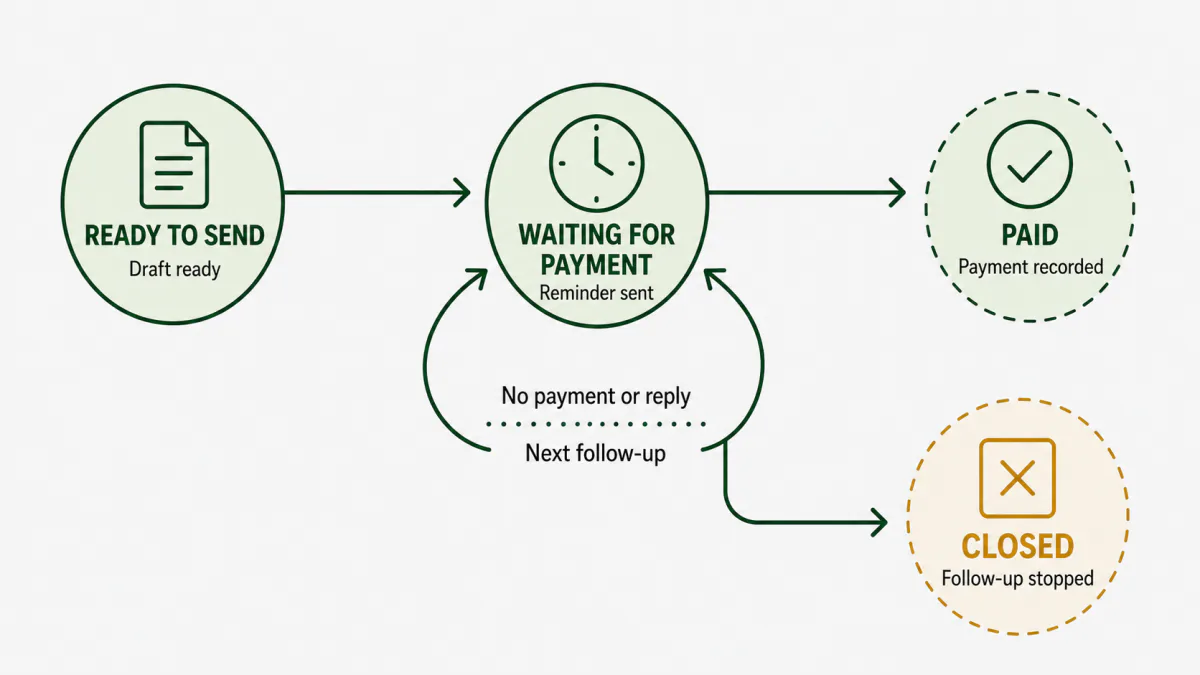
The four main states
| Status | What it means | What happens next |
|---|---|---|
| Ready to send | A reminder is ready, but the first one has not been sent. | Review the reminder and choose how to send it. |
| Waiting for payment | At least one reminder was sent. | Wait for the next check, payment, or reply. |
| Paid | Payment was recorded and nothing remains due. | Follow-up ends. |
| Closed | Follow-up was deliberately ended without marking the invoice paid. | Nothing else is sent. |
Details inside “Waiting for payment”
You may see a more specific detail without changing the main lifecycle:
- Client replied: read the reply and record what it means.
- Promised to pay: wait until the promised date, then check the payment.
- Promise missed: prepare the next follow-up.
- Disputed: decide how to resolve the issue before sending again.
- Partially paid: record the amount received; the remaining balance still needs an outcome.
Can I correct a status?
Yes. Use Correct status on the invoice when the displayed state does not match what actually happened.
Paid and Closed are protected outcomes:
- Record a payment to mark an invoice Paid.
- Use the close or write-off action to mark it Closed.
This keeps the invoice history accurate instead of changing the label without recording why.
Where is the next action?
The invoice page shows the next action and date near the top. The same item also appears in Schedule.