Help
Email & follow-up
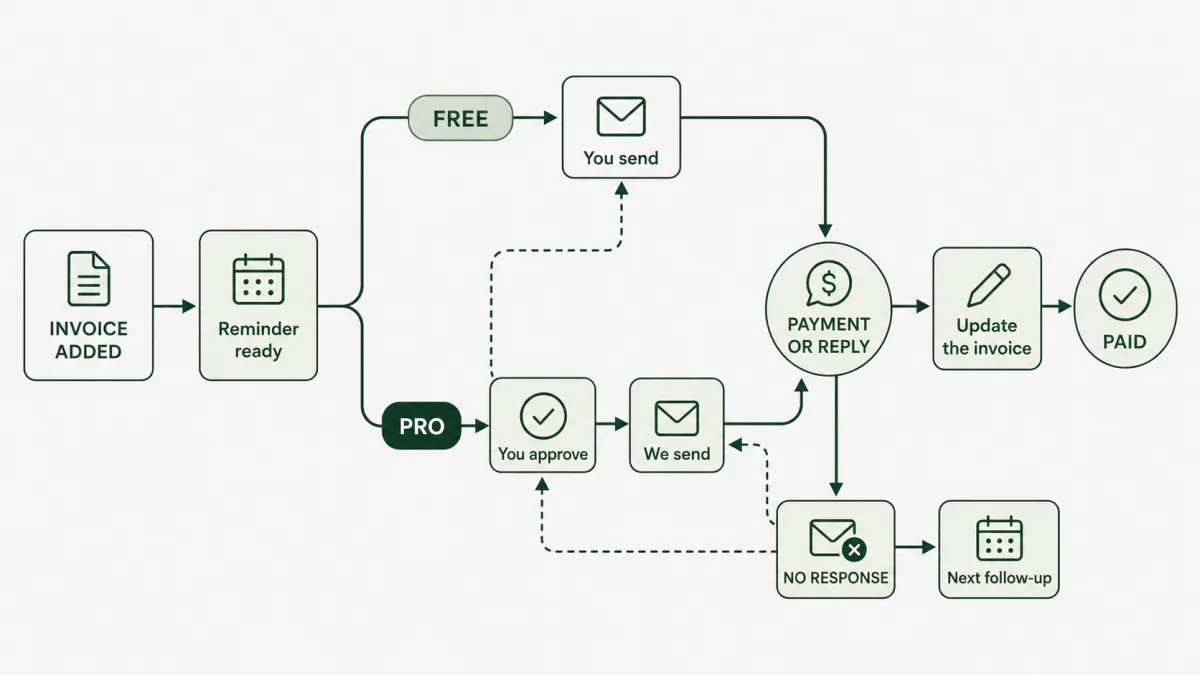
There are two kinds of email: email to you, and reminders to the payer. They are kept separate so you always know who will receive what.
Email to you
We use the notification email in Account → Notifications & time. If it is blank, we use your verified account email.
You may receive:
- Draft email: only when you click Email to me.
- Send check: the next local day if you emailed yourself a draft but have not marked it sent.
- Payment or promise check: when it is time to ask whether money arrived.
- Daily summary: one email for other due work, such as a missed promise.
- Needs attention: when a reply, payer action, or delivery problem needs your decision.
Payment checks do not also appear in the daily summary, so one task does not create two emails.
If you send the reminder yourself
- Review or edit the reminder.
- Copy it, or click Email to me.
- Send it from your own inbox.
- Click I sent it in bringme.money.
I sent it records what you already did. It does not send another email. We then schedule a check so you know when to look for payment or a reply.
If bringme.money sends it
Managed sending is a Pro feature. Before it starts, you approve:
- payer and sender details
- subject and message
- first send date and time
- follow-up timing and number of attempts
- whether to attach the invoice PDF
The usual plans are:
| Plan | Send days |
|---|---|
| Standard | Day 0, 3, 7, and 14 |
| Gentle | Day 0, 5, and 12 |
| Firm | Day 0, 2, 5, and 10 |
The payer can choose Payment sent, Need more time, or Question. A response pauses automatic follow-up and brings the invoice back to you.
What stops managed follow-up?
It stops or pauses when the invoice is paid or closed, the payer replies, an email bounces, the address is suppressed, or the system needs your decision.
Temporary delivery failures are retried. Repeated failures stop the sequence instead of continuing blindly.
When does email go out?
Owner checks use your workspace time zone and notification time. Managed payer reminders use the date, time, and time zone you approved. The scheduler checks every minute, so a normal delay is about one minute plus email delivery time.